
Private Meeting Room for 14

Crown Center Executive Suites (CCESuites)
1451 W. Cypress Creek Road, 300, Fort Lauderdale, FL 33309
- Confirmed Open
Miami Meeting Room
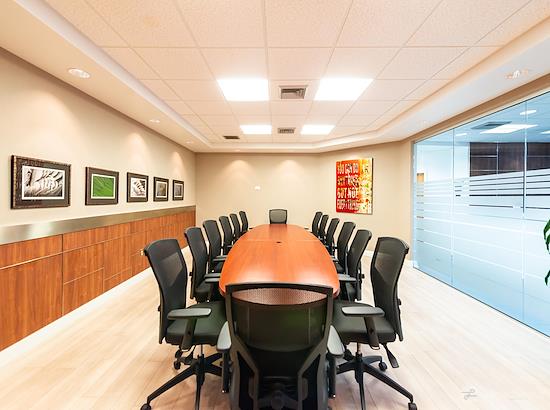
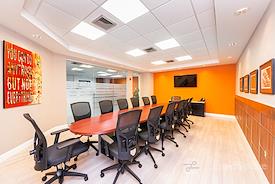
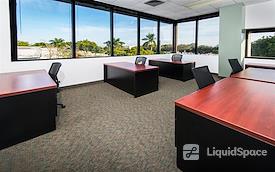
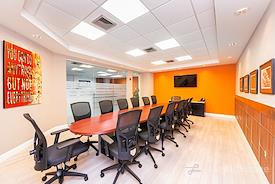
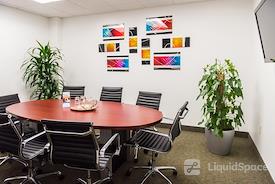
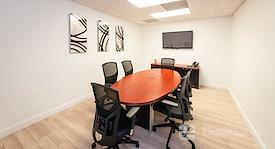
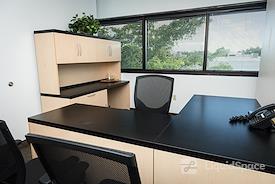
This beautiful, state of the art board room is perfect for any occasion. It offers a professional feel with newly renovated wood floors, boardroom table, executive chairs, and a 65-inch LED TV. It is the perfect way to present a professional image.
The Miami Meeting Room at Crown Center Executive Suites can also be used for a casual gathering as well.
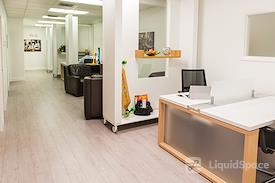
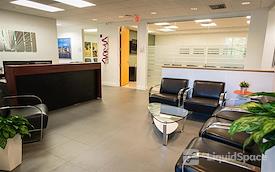
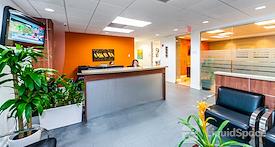
We offer a professionally staffed reception area that will greet your clients and guests. We also offer catering services, notary services, and administrative services.
RESERVE THE MIAMI MEETING ROOM TODAY!
Although Crown Center Executive Suites is open 24-hours a day for meeting rooms and day offices, before your first meeting, you must come into Business Center during business hours, Monday through Friday 8AM-5PM, so that our team can provide a key code and access card for building access.
(AFTER HOURS RESERVATIONS AFTER 5 PM REQUIRE A 2-HOUR MINIMUM, ANY RESERVATIONS AFTER HOURS OR WEEKENDS REQUIRE THE CLIENT TO COME BY THE OFFICE BEFORE RESERVATION TO HAVE ACCESS TO GET INTO THE BUILDING BY PICKING UP AN ACCESS CARD)
WiFi
Filming Allowed
Projector ($)
Fee is $20 for the day
Room Set-up
Video Conference ($)
Whiteboard
small whiteboard available to all clients
Door w/Lock
Phone
upon request
TV/Monitor
TV Monitors are in all of our meeting rooms with exception of Day Offices and Keys Room.
Accessibility
Bike Rack
Catering
Coffee/Tea
Filtered Water
Hosted Reception
Kitchen
Coffee, tea, filtered water, ice machine, microwaves, toaster ovens, seating.
Notary Services
Complimentary for client.
On-site Restaurant
Parking
Free parking onsite
Print/Scan/Copy

Full refund if you cancel 24 hours before the reservation start time.
Cancellation Policy
Cancellation Policy
Crown Center Executive Suites (CCESuites)
1451 W. Cypress Creek Road, 300, Fort Lauderdale, FL 33309
Crown Center Executive Suites (CCESuites)
1451 W. Cypress Creek Road, 300, Fort Lauderdale, FL 33309
Crown Center Executive Suites Crown Center Executive Suites offers flexible workspaces designed to match your lifestyle and business goals. Whether you need a private office, a meeting room for a day, or a virtual office, you’ll find a place that helps you focus, connect, and grow your business.
Located in a newly renovated, LEED-certified building in Fort Lauderdale, our center offers easy access to major highways, ample free parking, high-speed internet, an on-site café, and a professionally staffed reception team.
We offer:
• Private offices, shared workspace, and virtual office solutions
• Meeting rooms accommodating 4–16 guests
• Two large training rooms for up to 50 attendees
• Flexible terms: hourly, daily, weekly, or long-term
Meeting rooms and day offices are available 24/7. After-hours and weekend bookings must be reserved in advance during business hours, with access cards picked up Monday–Friday, 8 AM–5 PM.
Conveniently located on the north side of Cypress Creek Road between I-95 and 441.
Crown Center Executive Suites — Where Businesses Grow, and Connections Thrive.

374B New Private Office for 1
Private Office for 1
Starting at $552/mo.
1 month min. term
Private office for one person. Rent includes hard-wired internet, Wifi, coffee, tea, filtered water, lounge access, free parking, janitorial, utilities, maintenance, AC, business address, fax number, mail and package receipt, and shared reception.
New

375C Window Office
Private Office for 4
Starting at $1,089/mo.
1 month min. term
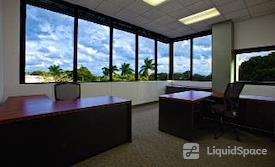
Private window office for 1 to 4 people. This is a great office for a great price, and it will not last long. Rent includes furniture, hardwired internet, Wi-Fi, free coffee, free parking, shared reception, business center, amenity center, networking events, free advertising, and more.

Brand new private office for 1 to 2
Private Office for 2
Starting at $638/mo.
1 month min. term
Brand new office available, includes furniture, hard-wired internet (fiber), Wi-fi, free coffee, tea, lounge access, free parking, free advertising and networking events, free notary, CAM, maintenance, janitorial, utilities, access to business center, podcast content studio, and new amenity/wellness center and more! Contact us for a tour and to learn about specials.

Office Suite 359
Team Office for 12
Starting at $3,213/mo.
1 month min. term
This office suite has 6 private offices and 6 cubicle stations. 24/7 access, furniture included; shared reception area; receptionist service; furniture w/ customized layout, Wi-fi system, restroom facilities; kitchen services - free coffee, tea & water service; business address; facsimile number; mail and package receipt; normal use of electrical, HVAC, and janitorial/maintenance service. Free parking, access to amenity center.
· Print, copy, scan, and fax services are available at a per-sheet charge
· Conference rooms are available
Suite 359 - 630 square foot newly remodeled private office with exposed ceilings and industrial feel. 6 small offices open onto a large open floor which contains 6 wired workspaces. Keyless keypad entry. Sufficient room for 12 -18

Suite 375A
Office Suite for 4
Starting at $1,142/mo.
1 month min. term
1 month free upfront on a 12-month lease. Large office for 1 to 4 people. 24/7 access; Secure hardwired high-speed internet, Wi-fi, furniture, free parking, free coffee/tea, reception service, advertising, free notary, business center, networking events, amenity center, utilities, CAM, maintenance, and more.

303 105 SQ FT Window office for 1
Private Office for 1
Starting at $722/mo.
1 month min. term
Private office window for 1 person.
Month-to-month terms or first month free on a 12-month. Fully furnished, shared Wi-fi and secure hardwire high-speed internet, 24/7 access, free gourmet coffee/tea, free parking, shared reception service, mail and package receipt, business address, free notary & shredding, free advertising and networking events.
New podcast room, new amenity center, conference rooms, day offices, training rooms, and business services also available.

383C Corner window double office for 2-8
Private Office for 8
Starting at $2,678/mo.
1 month min. term
383C Corner window double office for two to eight people. This office is two separate offices connected with plenty of windows in both. Rent Includes: furniture, hardwired internet, Wi-Fi, maintenance, janitorial service, utilities, shared reception, access to conference and meeting rooms, complimentary coffee, tea, and water service in our newly renovated lounge, a business address, mail and package receipt, and free, easy parking.

Shared Space
For 1 Open Desk (1 available)
Starting at $148/mo.
1 month min. term
Open Shared Space Room available 24/7. Each workstation features wifi and secure hardwire accessibility.
Monthly fee includes unlimited hours, access to Center amenities (complimentary coffee, tea, filtered water), parking, and more. Fee includes professional business address.


Reviews
Emely M.
5
Our team here at T-Mobile enjoyed the meeting space. The front desk lady is awesome.
Hourly Workspace • 02/26/2025
Miami Meeting Room at Crown Center Executive Suites (CCESuites)
1451 W. Cypress Creek Road, 300, Fort Lauderdale, FL 33309
Michelle H.
5
Excellent space and staff. Very accommodating and went above and beyond. Highly recommend!
Hourly Workspace • 02/14/2025
Miami Meeting Room at Crown Center Executive Suites (CCESuites)
1451 W. Cypress Creek Road, 300, Fort Lauderdale, FL 33309
Robin Bolger
5
Hourly Workspace • 01/03/2024
Miami Meeting Room at Crown Center Executive Suites (CCESuites)
1451 W. Cypress Creek Road, 300, Fort Lauderdale, FL 33309
Robert D.
4
clean well organized space. Staff very attentive
Hourly Workspace • 04/24/2023
Miami Meeting Room at Crown Center Executive Suites (CCESuites)
1451 W. Cypress Creek Road, 300, Fort Lauderdale, FL 33309
Karrie K.
5
Great space and will be using often.
Hourly Workspace • 08/12/2022
Miami Meeting Room at Crown Center Executive Suites (CCESuites)
1451 W. Cypress Creek Road, 300, Fort Lauderdale, FL 33309
Koby G.
2
WiFi was very slow when it did work. Most of the time it didn’t work. Room was very hot. Definitely not worth the money
Hourly Workspace • 01/26/2020
Miami Meeting Room at Crown Center Executive Suites (CCESuites)
1451 W. Cypress Creek Road, 300, Fort Lauderdale, FL 33309
Roosevelt S.
4
Great love the environment
Hourly Workspace • 11/14/2019
Miami Meeting Room at Crown Center Executive Suites (CCESuites)
1451 W. Cypress Creek Road, 300, Fort Lauderdale, FL 33309
Marielle Desir G.
CEO
5
This was an awesome meeting room thank you.
Hourly Workspace • 06/18/2015
Miami Meeting Room at Crown Center Executive Suites (CCESuites)
1451 W. Cypress Creek Road, 300, Fort Lauderdale, FL 33309
Anonymous
5
Hourly Workspace • 01/17/2015
Miami Meeting Room at Crown Center Executive Suites (CCESuites)
1451 W. Cypress Creek Road, 300, Fort Lauderdale, FL 33309